Español
 Italiano
 Polski

There are no more items in your cart

Running a small business means wearing ten hats at once. Microsoft Office 365 Business takes email, documents, and teamwork off your worry list. Add real Microsoft 365 support and you get a setup that just works, day after day.
How to get an affordable Office 2024 home and business key in USA?
The affordable Office 2024 home and business key in USA is available at Key-Softs. Enjoy verified Microsoft keys for home or small business use. Key-Softs ensures fast, reliable service. Purchase your genuine Office license from Key-Softs.
Which is the best deal Office 2024 home & business license in UK?
For the best deal Office 2024 home & business license in UK, choose Key-Softs. Get official Microsoft activation with digital delivery. Key-Softs offers great pricing and authenticity. Trust Key-Softs for secure Office purchases every time.
What is the top Office 2024 home and business download in UK?
Get the top Office 2024 home and business download in UK from Key-Softs. Enjoy quick access, verified keys, and affordable pricing. With Key-Softs, your software is 100% genuine. Simplify your purchase and activate easily with Key-Softs.
Where to buy an Office 2024 home & business license online in UK?
For an Office 2024 home & business license online in UK, Key-Softs is your trusted choice. Get digital delivery, authentic Microsoft keys, and lifetime access. Key-Softs guarantees satisfaction and reliability. Order today from Key-Softs.
What is Microsoft 365 Business?
It's a subscription bundle with Word, Excel, Outlook, Teams, and cloud storage, built for small and growing companies.
Is Office 2024 the same as Microsoft 365?
Office 2024 is a one-time purchase with fixed apps. Microsoft 365 is a subscription that updates continuously and adds cloud tools.
Do I need internet access to use it?
Desktop apps like Word and Excel work offline. Syncing and Teams calls need a connection.
Can multiple employees share one plan?
Business plans support several user accounts, each with their own login and mailbox.
What happens if I lose a document?
Cloud storage through OneDrive keeps backup copies, so recovery is usually quick.
Does Key Soft help with setup?
Our team handles installation, account migration, and staff training from start to finish.
Is my business data secure with Microsoft 365?
Microsoft uses encryption and multi-factor authentication. We add extra configuration to match your specific risk level.
Can I switch from Office 2024 to Microsoft 365 later?
Yes, and we can guide that transition without disrupting your files or workflow.
What kind of support is included?
Basic troubleshooting comes from Microsoft directly. Key Soft offers hands-on, faster-response local support for daily issues.
How much does a business plan cost?
Pricing depends on user count and features needed. We'll help you pick a plan that fits your budget, not just your headcount.
A local bakery owner once told us her biggest fear wasn't competition. It was losing an order file the night before a big wedding cake delivery. That's the kind of moment Microsoft Office 365 Business protects against. Documents live in the cloud, not just on one laptop that could crash at 2 a.m.
Email is often where things fall apart first. Outlook inside Microsoft 365 keeps a business email address looking professional, not like a random Gmail account cobbled together years ago. Clients notice that detail more than owners think they do.
Teams handles the coordination side. Staff working from a shop floor, a home office, or a delivery van can still hop on a call or share a file without switching between five different apps.
Where Office 2024 Fits In
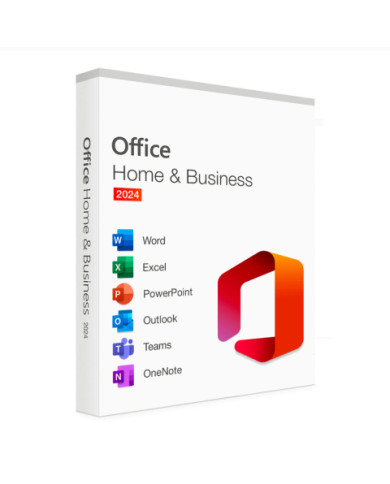
Some businesses don't want a subscription. They want to buy software once and be done with it for a few years. That's exactly what Office 2024 offers. Word, Excel, PowerPoint, and Outlook, installed permanently, no monthly bill.
It suits a small firm with steady, simple needs. A single-location bookkeeping office, for example, rarely needs the newest cloud features every month. They just need reliable tools that don't change on them without warning.
The tradeoff is updates. Office 2024 won't get new features added later. Microsoft 365 does, automatically, without extra cost.
The Support Piece Nobody Talks About Enough
Buying software is the easy part. Getting help when something breaks at 4:45 on a Friday is where most companies feel stuck. That's the gap Microsoft 365 support is supposed to fill, and where a lot of businesses get frustrated with generic call centers.
Key Soft handles this differently. When a client's Outlook stops syncing or a shared folder disappears, we're reachable and we know their setup already, because we built it.
A few things our support typically covers:
We've noticed smaller companies often delay calling for help until something is already broken. Waiting rarely saves money. A quick fix early usually costs less time than an emergency fix later.
Choosing Between the Two
There isn't one correct answer here. It depends on how a business actually operates.
Consider Office 2024 if:
Consider Microsoft 365 Business if:
A retail store with two registers and one back office might do fine with Office 2024. A consulting firm with clients in three cities almost always leans toward Microsoft 365, mainly for the collaboration tools.
Getting Set Up Without the Headache
Migrating to a new system, or even switching plans within Microsoft's ecosystem, brings up real questions. Where do old emails go? Will file formatting break? Can staff keep working during the switch?
These aren't small concerns. A poorly planned migration can cost a business real hours, sometimes days, of lost productivity. That's usually where outside help earns its cost back quickly.
Our approach starts with a short conversation about current tools, team size, and pain points. From there, we map out a migration plan that avoids downtime as much as possible. Training comes after setup, because software nobody knows how to use isn't actually helping anyone.
A Quick Word on Security
Both Office 2024 and Microsoft 365 include baseline security features. Encryption, sign-in protection, and permission controls are standard. But default settings rarely match every business's actual risk level.
A medical office handling patient records needs stricter access rules than a small landscaping company. Part of our setup process involves adjusting these settings so protection matches what a business actually needs, not a one-size-fits-all template.
Final Thoughts Before You Decide
Neither option is universally better. Office 2024 suits steady, simple operations. Microsoft 365 suits businesses that grow, move, or collaborate often. The right support behind either choice matters just as much as the software itself.
Key Soft builds honest, human-first tech support around real businesses, not scripts, because your problems deserve people who actually pick up the phone.