
 Español
 Italiano
 Polski


Microsoft Office 2024 vs Office 365: Which License Fits Your Workflow?
- 14 Aug, 2026
- Home
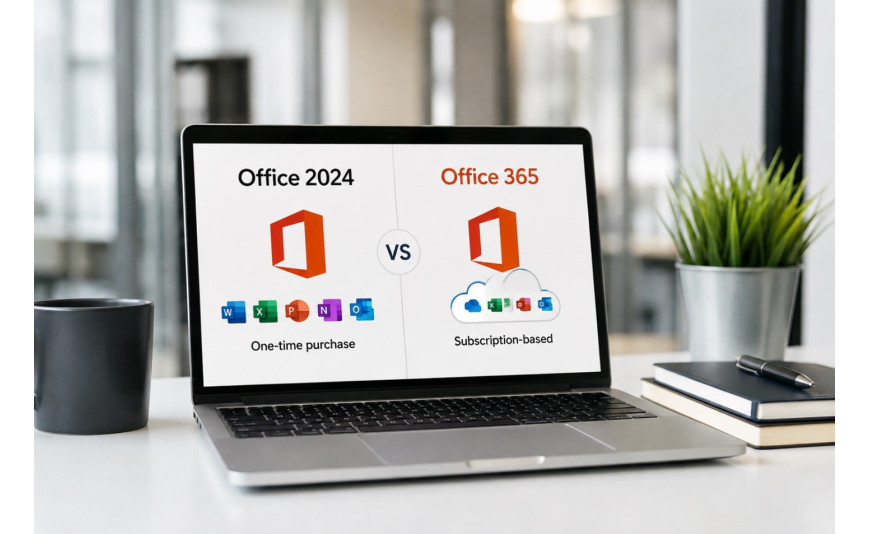
Microsoft offers two very different ways to get Word, Excel, PowerPoint, and the rest of the Office suite onto your computer: a one-time purchase edition like Office 2024, or a subscription plan under the Microsoft 365 (formerly Office 365) umbrella. Both give you access to the core applications, but the licensing model, update schedule, and long-term cost differ significantly.
This guide breaks down what a one-time Office 2024 purchase actually gets you, how it compares to a Microsoft 365 subscription, and what a longer-term account setup means for ongoing access.
Office 2024: The One-Time Purchase Model
Office 2024 follows the traditional licensing approach Microsoft has used for decades: you pay once, and the license is tied to a specific device rather than renewing on a schedule. An office 2024 professional plus online key activates the Professional Plus edition, which typically includes Word, Excel, PowerPoint, Outlook, Publisher, and Access.
The tradeoff with a one-time purchase is that it does not include ongoing feature updates the way a subscription does. You get security patches, but new features introduced in later Office versions generally require a separate purchase down the line. This model suits users who want a stable, unchanging toolset on one device and prefer not to think about renewals.
Microsoft 365 Personal: The Subscription Model
Microsoft 365 Personal (the direct successor to what was called Office 365 Personal) works differently. Instead of a single upfront payment, you pay for a recurring license term, commonly sold as an office 365 personal key 12 months subscription. This grants access to the full Office app suite along with continuous feature updates for as long as the subscription remains active.
Microsoft 365 subscriptions also typically bundle in extras beyond the core apps, such as OneDrive cloud storage and ongoing security updates delivered throughout the subscription term. Once the subscription lapses, though, editing access to the desktop apps is generally restricted until it is renewed, so the model depends on keeping the license current.
What "Permanent Account" Options Mean
You may also come across listings for a microsoft office 365 permanent account global setup. This generally refers to an account-based Microsoft 365 subscription configured for long-term or extended-term use rather than a short renewal cycle, as opposed to a device-only activation key. Before purchasing any account-based license, confirm exactly what is included, how long the specific term lasts, and how the account is transferred or supported, since terms can vary between sellers.
Comparing the Two Models
|
Factor |
Office 2024 (one-time) |
Microsoft 365 (subscription) |
|
Payment structure |
Single upfront cost |
Recurring subscription term |
|
Feature updates |
Security patches only |
Continuous feature updates |
|
Cloud storage included |
No |
Typically yes (OneDrive) |
|
Device flexibility |
Tied to one device |
Often usable across multiple devices, depending on plan |
|
Best for |
Users who want a stable, unchanging toolset |
Users who want ongoing updates and cloud integration |
Which One Should You Choose?
If you use Office lightly and prefer to avoid recurring payments, a one-time purchase can make sense, particularly if you are comfortable using the same feature set for several years without upgrading. This model also appeals to users on a fixed budget who want to know the total cost upfront rather than committing to an ongoing bill.
If you rely on Office daily, want continuous access to new features, and value having cloud storage built into your plan, a subscription-based setup is generally the better fit. Subscriptions also tend to work well for households or freelancers who need Office installed across more than one device, since the ongoing cost is often offset by the added storage and multi-device access included in the plan.
A Note on Licensing Terms
Microsoft's exact feature sets, supported device counts, and included storage allowances have changed across different Office and Microsoft 365 releases over the years. Before purchasing any license, check Microsoft's current official documentation for the specific plan you are considering, since details can vary by region and by the exact plan tier.
Conclusion
Office 2024 and Microsoft 365 solve the same basic problem in different ways. Office 2024 suits users who want to pay once and stick with a fixed set of features. Microsoft 365, whether purchased as a 12-month term or a longer-term account setup, suits users who want ongoing updates, cloud storage, and multi-device flexibility. Think about how often you actually use Office and how much you value staying current with new features before deciding which license fits your workflow.
Whichever model works for you, Key-Softs offers genuine digital keys and account options with instant delivery to get your Office suite up and running quickly.
Frequently Asked Questions
Can I switch from a one-time Office license to a Microsoft 365 subscription later?
Yes, you can purchase a Microsoft 365 subscription independently at any time. The two licenses are not linked, so moving from one to the other simply means activating the new license through your Microsoft account or device settings.
Does Office 2024 receive security updates?
Yes, Microsoft typically provides security updates for a defined support period after a one-time purchase edition is released. Check Microsoft's official support documentation for the specific end date of that support window.
What happens to my documents if my Microsoft 365 subscription expires?
Your existing files remain on your device and in any connected cloud storage. However, full editing functionality in the desktop apps is generally limited until the subscription is renewed, and you may be moved into a reduced-functionality viewing mode.
Is Professional Plus different from the standard Office Home & Business edition?
Yes. Professional Plus editions generally include additional applications, such as Access and certain business-oriented tools, that are not part of Home & Business editions. Check the specific app list for the edition you are purchasing to confirm it includes what you need.






